Tag: Voice AI Agent

  • What Is A Voice AI Agent? How Conversational AI Works End To End

    What Is A Voice AI Agent? How Conversational AI Works End To End

    Phone support is still one of the most critical channels in customer service. It is expensive to staff, hard to scale, and often leads to frustrating experiences for both customers and agents. Long hold times, robotic interactions, and endless repetition have become the norm.

    But something is changing. Voice AI agents are experiencing a renaissance. Voice is used in 82% of all customer interactions, up from 77% just a year ago (Metrigy Customer Experience Optimization: 2025-26). The market for voice and speech recognition technology is projected to grow from $14.8 billion in 2024 to over $61 billion by 2033.

    This is not just about replacing phone trees with slightly better automation. Modern voice AI agents can understand natural speech, process meaning, and respond conversationally. They can handle complex workflows, integrate with business systems, and hand off to humans when needed.

    In this guide, we will break down exactly how voice AI agents work, from the moment a caller speaks to the moment the agent responds. We will explore the architecture, the use cases, and the business value. And we will look at what it takes to build voice AI that actually works in production.

    What Is a Voice AI Agent?
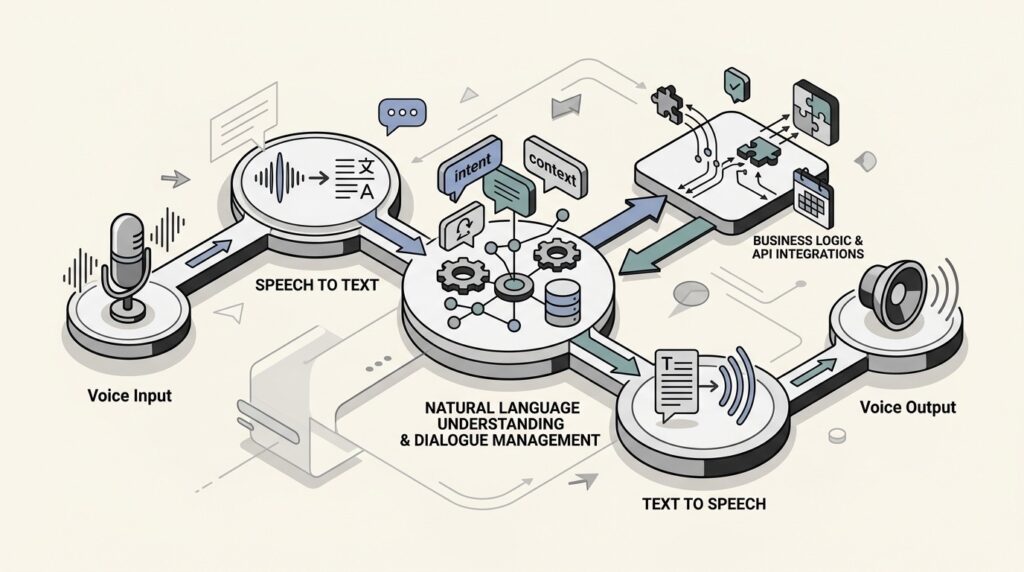
    A voice AI agent is an intelligent, speech-driven system that can understand natural language, determine intent with context, and complete tasks in real time. Think of it as a skilled receptionist that never misses a call, responds instantly, and maintains full awareness of the conversation.

    Unlike traditional interactive voice response (IVR) systems that force callers through rigid menu trees (“Press 1 for sales, Press 2 for support”), voice AI agents understand natural speech. A caller can say “I need to reschedule my appointment” or “My order never arrived” and the agent understands what they want.

    Here is what a voice AI agent can do:

    • Interpret caller requests expressed in natural language, identifying whether the person is trying to reschedule an appointment, ask a question, or escalate an issue
    • Access business systems required to complete the task, including calendars, CRM platforms, electronic health records, or billing tools
    • Carry out operational tasks from start to finish, such as booking appointments, qualifying leads, or checking policy details
    • Route callers based on true conversational intent, sending them directly to the right team member instead of forcing them through menu-based navigation
    • Document every interaction as structured data, capturing intent, sentiment, outcomes, and follow-up requirements

    The leap in capability reflects a broader shift in customer engagement. Voice is not going away. In fact, it is becoming more essential as businesses realize that phone interactions remain the preferred channel for urgent, complex, or critical issues.

    The Core Architecture: How Voice AI Works End to End

    From the caller’s perspective, the interaction is simple: they speak, and the agent responds. Behind that simplicity is a layered process that blends multiple technologies into a seamless pipeline.

    Let’s break down the core architecture that makes this possible.

    Speech Recognition (ASR)

    Every voice interaction starts with automatic speech recognition (ASR). This component converts spoken audio into text that the system can process.

    Modern ASR systems have come a long way from the rigid voice recognition of the past. Today’s systems can:

    • Transcribe different accents and speech patterns at high accuracy (top systems achieve word error rates as low as 3.1%)
    • Handle background noise and challenging audio environments
    • Process speech in real time with minimal delay
    • Support multiple languages and even detect language switches mid-conversation

    The quality of your ASR layer directly impacts everything downstream. A 95% accurate system produces 5 errors per 100 words. An 85% accurate system produces 15 errors per 100 words. That difference determines whether your voice AI feels helpful or frustrating.

    Language Understanding (LLM)

    Once speech becomes text, a large language model (LLM) figures out what the user actually wants. This goes far beyond simple keyword matching.

    The LLM handles:

    • Intent detection: Determining whether the caller wants to book an appointment, check an order status, or file a complaint
    • Entity extraction: Pulling out specific details like dates, names, order numbers, or policy types
    • Context management: Remembering information shared earlier in the conversation so callers do not have to repeat themselves
    • Reasoning: Working through complex requests that require multiple pieces of information or conditional logic

    This is where modern voice AI diverges from older systems. Traditional IVR could only handle rigid commands. Today’s LLM-powered agents can follow complex conversations, remember context from earlier exchanges, and respond to interruptions or changes in topic.

    Text-to-Speech (TTS)

    The final component transforms the agent’s text response back into spoken words. Text-to-speech technology has evolved to create voices that capture natural rhythm, emphasis, and emotion.

    Advanced TTS systems can:

    • Match tone to the emotional state of the conversation
    • Use appropriate pacing and pauses for clarity
    • Pronounce industry-specific terminology correctly
    • Switch voices or languages mid-conversation when needed

    The goal is not just to sound human, but to sound appropriate for the context. A healthcare voice agent should sound calm and reassuring. A sales agent might be more upbeat and energetic.

    The Orchestration Layer

    Beyond the core speech components, a production voice AI needs an orchestration layer that manages the conversation flow. This layer:

    • Chooses the best resolution path based on intent
    • Connects to business systems via APIs (CRM, ticketing, scheduling, billing)
    • Handles error recovery when something goes wrong
    • Decides when to escalate to a human agent
    • Maintains conversation state across multiple turns

    Without solid orchestration, even the best speech recognition and language models produce disjointed, frustrating experiences.

    Latency Requirements

    One factor that binds all these components together is latency. For a conversation to feel natural, the agent must respond within 250 milliseconds. Anything longer creates awkward pauses that break the conversational flow.

    Achieving sub-250ms latency requires careful optimization across the entire pipeline: fast ASR, efficient LLM inference, streaming TTS, and minimal network overhead.

    Three Architectural Approaches Compared

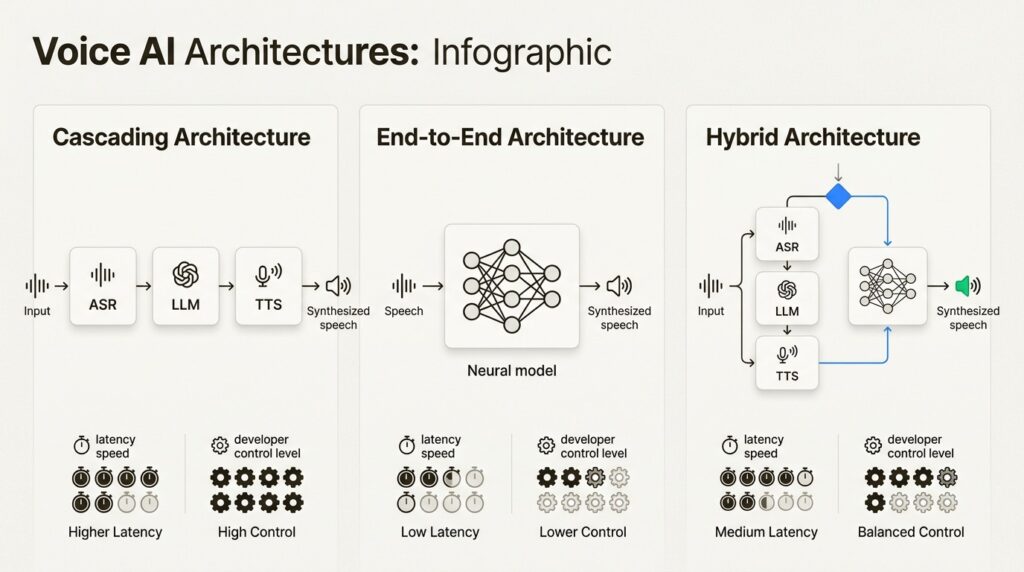
    While the cascading model (ASR → LLM → TTS) is common, it is not the only way to build a voice agent. The architecture you choose impacts everything from latency to conversational flexibility.
    Cascading Architecture

    The traditional approach uses a series of independent models: speech-to-text, then a language model for understanding, then text-to-speech for the response.

    Strengths:

    • Modular and easier to debug
    • High control and transparency at each step
    • Robust function calling and structured interactions
    • Reliable, predictable responses

    Best for: Structured workflows, customer support scenarios, sales and inbound triage

    Trade-offs: The handoffs between components can add latency, sometimes making conversations feel slightly delayed.

    End-to-End Architecture

    This newer approach uses a single, unified AI model to handle the entire process from incoming audio to spoken response. OpenAI’s Realtime API with gpt-4o-realtime-preview is an example of this approach.

    Strengths:

    • Lower latency interactions
    • Rich multimodal understanding (audio and text simultaneously)
    • Natural, fluid conversational flow
    • Captures nuances like tone and hesitation better than cascading systems

    Best for: Interactive and unstructured conversations, language tutoring, conversational search and discovery

    Trade-offs: More complex to build and fine-tune. Less transparent since you cannot inspect the intermediate text representations.

    Hybrid Architecture

    A hybrid approach combines the best of both worlds. It might use a cascading system for its robust, predictable logic but switch to an end-to-end model for more fluid, open-ended parts of a conversation.

    Strengths:

    • Optimizes for both performance and capability
    • Can use cascading for structured tasks and end-to-end for natural conversation
    • More flexible than either pure approach

    Best for: Complex applications that need both reliability and conversational flexibility

    ArchitectureLatencyControlBest For
    CascadingHigherHighStructured workflows, support
    End-to-EndLowerMediumFluid conversations, tutoring
    HybridMediumHighComplex, multi-modal applications

    Real-World Use Cases and Applications

    Voice AI agents have moved beyond novelty to become practical business tools across every industry. Here are the key applications delivering measurable results.

    Customer Support Automation

    The most common use case is handling tier-1 support calls without wait times. Voice AI agents can:

    • Answer common questions using knowledge base articles
    • Troubleshoot basic issues through guided conversations
    • Process returns, refunds, and account changes
    • Create and update support tickets with full context
    • Escalate complex issues to human agents with conversation summaries

    In some implementations, AI agents now manage as much as 77% of level 1 and level 2 client support.

    Appointment Scheduling

    Healthcare clinics, salons, and service businesses use voice AI to handle scheduling without staff involvement:

    • Book appointments across multi-provider calendars
    • Handle rescheduling and cancellations
    • Send reminders and confirmations
    • Collect pre-visit information
    • Route urgent requests to appropriate staff

    Sales and Lead Qualification

    For sales organizations, inbound voice interactions are often time-sensitive. Voice AI agents can:

    • Ask predefined questions to qualify leads
    • Route qualified leads to the appropriate sales team
    • Capture key information for follow-ups
    • Log call summaries into connected CRM systems
    • Provide 24/7 coverage for after-hours inquiries

    Healthcare Coordination

    Healthcare organizations have specific requirements around compliance and accuracy. Voice AI agents in healthcare can:

    • Manage appointment scheduling and reminders
    • Conduct pre-visit questionnaires
    • Provide medication reminders
    • Route urgent medical concerns to appropriate staff
    • Maintain HIPAA compliance throughout interactions

    Internal Operations

    Voice AI is not just for customer-facing use cases. Internal applications include:

    • Hands-free access to manuals and documentation for field technicians
    • Inventory management and parts ordering
    • Time tracking and work logging
    • Equipment status checks
    • Safety reporting

    Business Benefits and ROI

    The business case for voice AI agents goes beyond cost reduction. When implemented correctly, they transform operations across multiple dimensions.
    Operational Efficiency

    Voice AI agents deliver three key operational advantages:

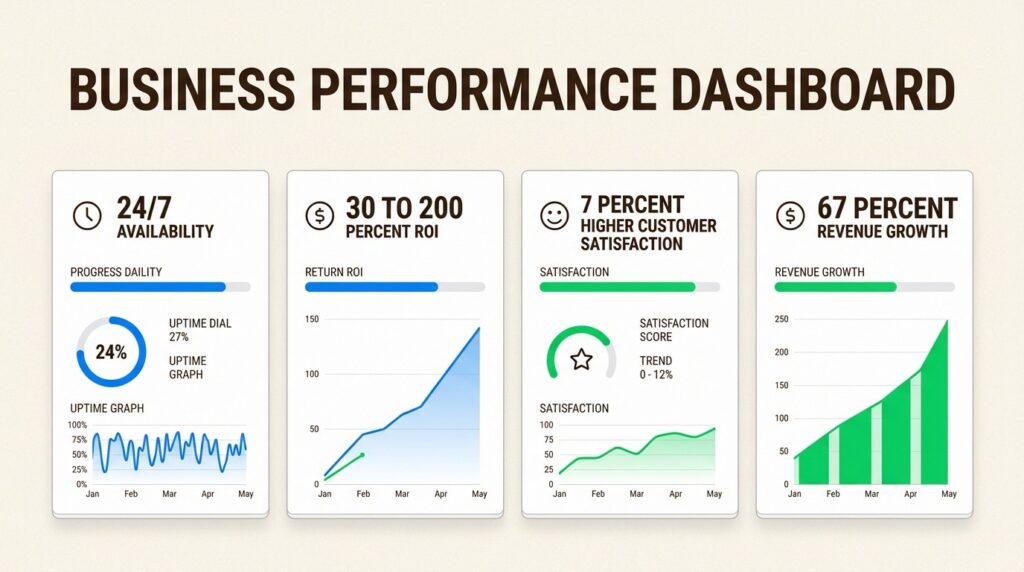
    • 24/7 availability: Provide instant support to customers in any time zone without increasing headcount
    • Reduced handling time: Automate data collection and initial troubleshooting to resolve issues faster
    • Lower operational costs: Decrease reliance on large contact center teams for routine support

    Businesses implementing automation see ROI improvements ranging from 30% to 200% in the first year.

    Customer Experience

    Long wait times and inconsistent service are major sources of customer frustration. Voice AI agents address these pain points directly:

    • No more wait times: Instantly answer incoming calls, eliminating frustrating queues
    • Consistent information: Ensure every customer receives standardized, correct information pulled directly from your knowledge base
    • Personalized interactions: Use data from your CRM to greet customers by name and understand their history

    Automating workflows can improve customer satisfaction by nearly 7%.

    Business Scalability

    As your business grows, so does the volume of customer interactions. Voice agents provide a scalable solution:

    • Handle thousands of concurrent calls without performance drops
    • Expand your customer base without linear increases in support staff costs
    • Manage seasonal spikes and unexpected volume surges
    • Enter new markets with 24/7 coverage from day one

    67% of telecom businesses using automation report revenue increases.

    Data and Insights

    Unlike human agents who may forget to document calls, voice AI agents automatically record and categorize every conversation:

    • Structured data on intent, sentiment, and outcomes
    • Analytics for identifying trends and improvement opportunities
    • Quality monitoring without manual review
    • Training data for continuous improvement

    Key Challenges and Considerations

    Voice AI agents are powerful, but they are not magic. Building systems that work in production requires addressing several key challenges.
    Latency

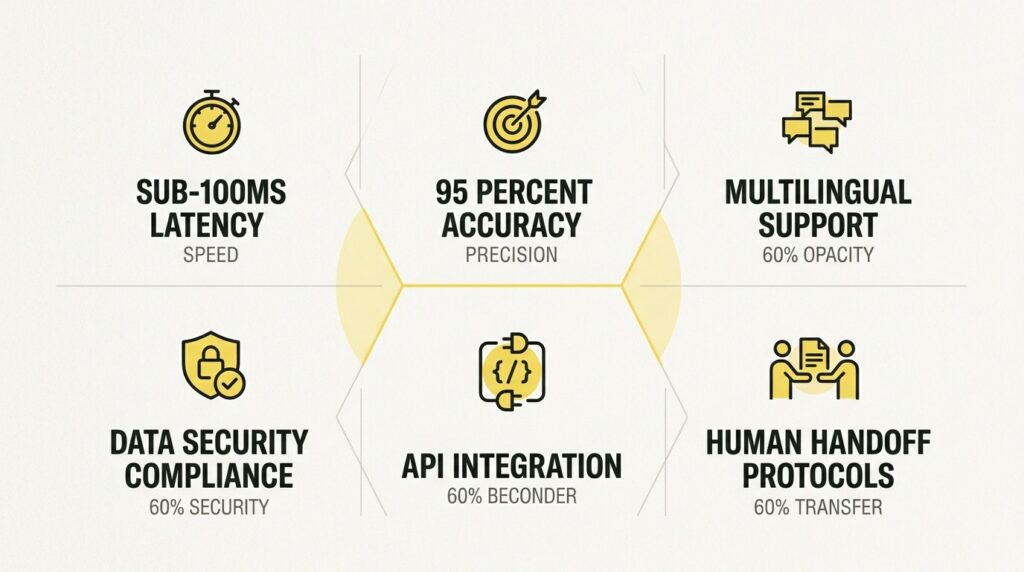
    For a conversation to feel natural, the agent’s response time must be near-instantaneous. High latency leads to awkward pauses and a frustrating user experience. Look for platforms optimized for real-time streaming transcription and low-latency responses.

    Accuracy

    The difference between an 85% accurate system and a 95% accurate one is significant. It can mean reducing transcription errors from 15 per 100 words to just five. Test any platform with your own audio data, including accents, background noise, and industry-specific terminology.

    Multilingual Support

    If you serve diverse populations, language support is critical. This includes not just multiple languages, but:

    • Accent and dialect variations
    • Codeswitching (mixing languages mid-sentence)
    • Regional terminology and expressions
    • Language detection and automatic switching

    Most platforms claim multilingual support, but quality varies significantly across languages.

    Security and Compliance

    Voice interactions often involve sensitive information. Key considerations include:

    • Data encryption: Both in transit (TLS) and at rest (AES-256)
    • Compliance certifications: SOC 2 Type II, ISO 27001, HIPAA for healthcare
    • Consent management: Recording and data usage disclosures
    • Data residency: Where voice data is stored and processed
    • Retention policies: How long recordings are kept and how they are deleted

    The 2024 FCC ruling affirmed that AI-generated voices are considered “an artificial or pre-recorded voice” under the Telephone Consumer Protection Act (TCPA), making consent rules apply to voice AI agents.

    Integration Complexity

    Voice AI agents rarely operate in isolation. You will need to connect to:

    • CRM systems
    • Ticketing platforms
    • Scheduling systems
    • Billing and payment systems
    • Internal databases and APIs

    The complexity of these integrations often determines how much value you can actually extract from voice AI.

    Human Handoff

    Even the best voice AI agents cannot handle everything. You need clear escalation paths:

    • When should the agent transfer to a human?
    • What context should be passed along?
    • How do you handle the transition smoothly?
    • What happens if no human is available?

    Getting handoff right is often the difference between a voice AI that helps customers and one that frustrates them.

    Building Voice AI on Your Terms

    At Shunya Labs, we have spent years solving the fundamental problems that make voice AI expensive, slow, and insecure. Our approach differs from generic API providers in several key ways.

    Foundation Models Built for Voice

    Rather than stitching together third-party APIs, Shunya Labs have built our own foundation models specifically for voice:

    • Zero STT: General-purpose transcription supporting 200+ languages
    • Zero STT Indic: Specialized for superior accuracy in Indian languages
    • Zero STT Codeswitch: Native model for multilingual speech mixing
    • Zero STT Med: Domain-specific recognition for medical terminology

    This matters because speech recognition quality varies dramatically by language and domain. A model trained primarily on English will struggle with Indic languages. A general-purpose model will miss medical terminology. Our specialized models address these gaps.

    Deployment Flexibility

    Not every organization can send voice data to the cloud. Shunya Labs offer deployment options that match your security and latency requirements:

    • Cloud API: Fully managed, scales automatically
    • Local Deployment: Run on your own infrastructure
    • On-Premises/Edge: For strict data sovereignty or ultra-low latency requirements

    We maintain SOC 2 Type II, ISO 27001, and HIPAA compliance.

    Deep Regional Expertise

    Our roots in the Indic languages have given us unique capabilities:

    • Support for 55+ Indic languages with more in development
    • Native handling of codeswitching (Hinglish, Tanglish, etc.)
    • Understanding of regional accents and dialects
    • Cultural context for conversational AI

    Frequently Asked Questions

    How does a voice AI agent differ from a traditional IVR system?

    A traditional IVR forces callers through rigid menu trees. A voice AI agent understands natural speech, can handle complex conversations, remembers context from earlier exchanges, and responds to interruptions or changes in topic. It can also integrate with business systems to complete tasks end-to-end rather than just routing calls.

    What is a voice AI agent’s typical response time?

    For natural conversation, voice AI agents need to respond within 250 milliseconds. Anything longer creates awkward pauses. Achieving this requires optimization across speech recognition, language model inference, and text-to-speech generation.

    Can a voice AI agent handle multiple languages in one conversation?

    Advanced voice AI agents can handle codeswitching, where callers mix languages mid-sentence (like Hinglish or Spanglish). This requires specialized models trained on multilingual speech patterns, not just separate language models stitched together.

    What compliance requirements apply to voice AI agents?

    Voice AI agents must comply with regulations like the Telephone Consumer Protection Act (TCPA) in the U.S., which requires consent for automated calls. For healthcare applications, HIPAA compliance is mandatory. Look for providers with SOC 2 Type II and ISO 27001 certifications.

    How do voice AI agents integrate with existing business systems?

    Modern voice AI agents connect to CRM platforms, ticketing systems, scheduling tools, and internal databases via APIs. The orchestration layer handles these integrations, allowing the agent to look up customer data, create tickets, book appointments, and trigger workflows during live conversations.

    When should a voice AI agent transfer to a human?

    Voice AI agents should escalate when they detect complex issues beyond their training, emotional distress or frustration from the caller, requests requiring human judgment or empathy, or technical failures. The best implementations pass full conversation context to the human agent so callers do not have to repeat themselves.
  • How to Replace Your IVR with a Voice AI Agent: A Practical Playbook for Indian Contact Centres

    How to Replace Your IVR with a Voice AI Agent: A Practical Playbook for Indian Contact Centres

    TL;DR , Key Takeaways:

    • Start with a call flow audit. Ninety days of recordings, transcribed and clustered by intent. Without it, your deflection rate estimates are guesses. With it, they carry ±5% accuracy from week one of deployment.
    • The audio path is: PSTN → SBC (Ribbon/AudioCodes/CUBE) → FreeSWITCH → ASR WebSocket → LLM → TTS → back to FreeSWITCH. Total end-to-end latency target: 450-650ms on cloud, sub-300ms on-premise.
    • G.711 8kHz telephony audio must be upsampled to 16kHz PCM before sending to Zero STT. Use librosa kaiser_fast (0.3ms/chunk). Never use a polynomial resampler for real-time, it adds 210ms latency per 2 seconds of audio.
    • Hindi affirmatives (हाँ, ठीक है, अच्छा) are 200-400ms long. The default 500ms barge-in window misses 40% of them. Set the minimum detection window to 150ms for Indic deployments.
    • TRAI mandates DTMF fallback for any automated system handling financial transactions, OTP delivery, or KYC in India. Voice-only deployment is non-compliant. TRAI can direct the telco to terminate your number.
    • Indian callers provide unsolicited context in ~34% of opening utterances. A linear slot-filler built for Western caller behaviour will silently discard this information.

    India’s IVR infrastructure is three decades old and has not changed meaningfully since the 1990s. Press 1 for billing. Press 2 for support. Say your account number now.

    The technology still runs on VXML 2.1 state machines, rigid call trees, and DTMF menus. It was designed for a world where callers had no alternative and customer experience was not a competitive variable. That world is gone. A recent Salesforce survey found that 83% of customers expect to interact with someone immediately when contacting a company. IVR systems do the opposite.

    Voice AI agents replace IVR not by layering intelligence on top of VXML but by replacing the fundamental interaction model. Instead of a menu, a caller has a conversation. Instead of routing by button press, the system routes by intent. Instead of pressing 0 to escape, a caller who needs a human gets one, automatically.

    This playbook covers those technical steps. It addresses audio architecture, barge-in handling, TRAI compliance, and the pre-migration work that determines whether the deployment succeeds from week one.

    Customers expect immediate response

    Salesforce Research, 2026

    Annual agent attrition in India

    Indian contact centre average

    Default VAD window misses 40% of Indic words like हाँ

    Correct threshold: 150ms for Indic

    Step Zero: The Call Flow Audit You Cannot Skip

    Before any architecture decision, before any vendor selection, before any integration work: you need around 90 days of call recording data transcribed and analysed.

    This is not optional preparation. It is the only way to know what callers actually say, which intents are genuinely automatable, and what your realistic deflection rate will be. Without it, every projection in your business case is a guess.

    The audit process has four steps. First, transcribe 90 days of call recordings with a batch ASR job. Shunya Labs Zero STT handles this via the REST API. Second, run k-means or LDA clustering on the transcripts to group calls by intent. Third, have a human review the cluster labels and build a ground-truth taxonomy from actual caller language. Fourth, classify intents as deflectable (no human judgement required, bounded answer space) or non-deflectable (complaints, escalations, complex queries).

    The audit takes three to four weeks. The payoff is significant. Without a call flow audit, first-month intent recognition accuracy in Indian contact centre deployments typically runs 71 to 78%. With a proper audit, teams consistently achieve 87 to 93% accuracy from week one.

    Callers describe the same intent in radically different ways. ‘Net nahi chal raha’, ‘broadband down hai’, and ‘connection ka problem hai’ can have the same intent. A taxonomy built from business assumptions will miss 20-30% of real caller expressions. The audit closes that gap.

    Understanding Your Existing IVR Architecture

    The migration path depends entirely on what you are replacing. Three stacks account for most Indian enterprise contact centres, and each has a different migration path.

    Cisco Unified CVP (VXML 2.1)

    This is the most common stack in Indian enterprise contact centres. Cisco CVP runs VXML 2.1 with JTAPI/TSAPI CTI middleware connecting to Avaya or Genesys ACD. The SIP trunk handoff happens at the CUBE (Cisco Unified Border Element).

    The key technical constraint: VXML 2.1 has no concept of streaming partial results. The entire utterance must complete before the VXML application can process it. Migration here requires replacing the VXML application entirely, not just the recognition endpoint. The CUBE adds 2 to 5ms processing overhead, which is within acceptable latency budgets but must be accounted for.

    Avaya Experience Portal

    Custom VXML applications running on Avaya Aura call control. The CTI event flow uses either TSAPI device events or JTAPI call events. Which one your deployment uses affects how agent screen-pop works after migration. Check this before designing your integration. Avaya Aura SIP trunks on Indian PSTN interconnects use G.711 a-law exclusively.

    Cloud IVR (Exotel, Knowlarity, Servetel)

    The simplest migration path. These platforms run managed Asterisk/FreeSWITCH with webhook-based flow builders. Their webhooks fire on DTMF input, not speech. Migration is a webhook redirect: replace the DTMF handler endpoint with a Voice AI endpoint that accepts the same webhook payload and returns the same response format. The first migration step is enabling ASR input alongside DTMF, not replacing DTMF entirely.

    The Full Telephony Audio Path

    This is the architecture every integration engineer needs to understand before touching a line of code. Every hop adds latency. Know where each millisecond goes.

    The full path is: PSTN → SBC (Ribbon, AudioCodes, or CUBE) → Media Server (FreeSWITCH or Asterisk) → ASR WebSocket (Zero STT) → NLU / LLM → TTS (Zero TTS) → back to Media Server → PSTN.

    ComponentLatency ContributionNotes
    G.711 packetisation20msFixed. 20ms RTP packets = 160 bytes each at 8kHz.
    SBC processing2-5msRibbon, AudioCodes, or Cisco CUBE.
    RTP to WebSocket transcoding5-8msAt the media server (FreeSWITCH).
    Zero STT first partial180-220msStreaming transcript, first words returned.
    NLU / LLM processing40-80msIntent and slot extraction.
    Zero TTS first audioUnder 100msFirst audio bytes returned.
    Audio playout20msBuffer at media server before sending to PSTN.
    TOTAL (cloud)450-650msp99. Sub-300ms requires on-premise deployment.

    Critical: use p99 latency, not p50

    Vendor latency specs cite p50 (median). Callers perceive p99.A system with p50 = 400ms and p99 = 1200ms will feel broken to roughly 1 in 100 callers. At 50,000 calls per month, that is 500 callers per month experiencing a broken interaction.Always measure and report latency at p99. Budget accordingly.

    The G.711 upsampling problem (most common failure point)

    Indian PSTN, including BSNL, Airtel, and Jio interconnects, is almost entirely G.711 a-law at 8kHz. Shunya Labs Zero STT expects 16kHz PCM. This gap causes more Indian IVR migration failures than any other single issue.

    When you upsample 8kHz audio to 16kHz, there is a hard frequency ceiling at 4kHz. No upsampling algorithm can recover frequencies above that ceiling because they were never captured. The perceptual impact is worst on Hindi retroflex consonants and English sibilants, which both rely on high-frequency spectral content above 4kHz.

    Use librosa.resample(audio, orig_sr=8000, target_sr=16000, res_type=’kaiser_fast’) for real-time processing. The kaiser_fast resampler costs 0.3ms per 20ms chunk. A polynomial resampler costs 2.1ms per chunk. At 20ms chunks, that difference compounds to 210ms of added latency per 2 seconds of audio. Do not use a polynomial resampler for live streaming.

    RTP chunk sizing

    Send 20ms RTP chunks directly to the WebSocket. One chunk = 320 bytes at 16kHz PCM 16-bit mono. WebSocket frame overhead is 6 bytes per frame, which is negligible.

    Do not buffer to larger chunks to reduce overhead. Developers who buffer to 200ms chunks to reduce the number of WebSocket sends add 180ms of unnecessary latency with every call. Each 20ms of additional buffer is 20ms added to every response in the call.

    Barge-In Handling: The Feature That Makes or Breaks Experience

    Barge-in is when a caller speaks while the voice agent is still talking. Legacy IVR systems handle this clumsily or not at all. A voice AI agent that does not handle barge-in correctly produces a broken experience: callers who try to interrupt get ignored, which forces them to wait for the agent to finish speaking before they can respond.

    Echo cancellation must be at the media server level

    Apply Acoustic Echo Cancellation (AEC) at the media server level using FreeSWITCH mod_dptools echo suppression. Do not apply it at the ASR level.

    If AEC is applied at the ASR level instead, partial transcripts of TTS playback feed back into the recogniser. The agent hears itself speaking and starts transcribing its own output as new input. In open-plan Indian contact centre environments with poor headset acoustic isolation, false barge-in rates increase by approximately 35% without proper AEC.

    VAD threshold calibration for Indian audio

    WebRTC VAD has an aggressiveness scale from 0 to 3. For Indian contact centre environments with a 65 to 70 dB ambient noise floor, aggressiveness 2 with a 150ms onset window is the correct starting point.

    VAD AggressivenessFalse Barge-in RateMissed Genuine Barge-ins
    0 (least aggressive)Very lowHigh (>25%)Too permissive for noisy floors
    1Low12-15% missedUnder-triggers on genuine speech
    2 + 150ms onsetControlled<5% missedRecommended for Indian contact centres
    3 (most aggressive)Every 8-12 secondsVery lowConstant false barge-ins in noisy environments

    India-specific: Hindi affirmatives are short
    हाँ (haan), ठीक है (theek hai), अच्छा (accha) are often 200-400ms in duration.The default Western barge-in detection window assumes a minimum utterance length of 500ms.At 500ms, roughly 40% of single-word Hindi affirmatives are missed. The caller says yes and the agent does not hear it.Set the minimum barge-in detection window to 150ms for all Hindi and Indic language deployments. This reduces missed affirmatives to under 5%.

    TTS interrupt and graceful stop

    When barge-in is detected, the state machine should follow this sequence: send RTP silence to the media server immediately, play an 80ms audio fade-out (below 80ms callers report the voice cutting off rudely), then begin streaming the new utterance to Zero STT. Do not restart the dialogue state.

    The context of the interrupted turn, including slots already filled and dialogue history, must carry forward. A caller who barged in mid-response should not be asked to repeat information they already provided. Losing filled slots on a barge-in is one of the top three CSAT drivers in early voice AI deployments.

    DTMF Fallback: The TRAI Compliance Requirement

    This is not optional and it is not a nice-to-have. TRAI regulations require a DTMF fallback path for any automated voice system handling financial transactions, OTP delivery, or KYC verification in India.

    A voice-only deployment with no DTMF fallback is non-compliant. TRAI can direct the telco to terminate the number used by a non-compliant automated system. The exposure is not just poor user experience. It is a number that stops working.

    RFC 2833 vs SIP INFO: silent DTMF loss

    DTMF can travel over two different paths. RFC 2833 sends DTMF as RTP telephone-event packets, in-band alongside the voice. SIP INFO sends DTMF as out-of-band SIP messages. Which one arrives depends on your SBC configuration and your carrier.

    Knowlarity and Exotel use RFC 2833. Cisco CUBE typically uses SIP INFO. If your FreeSWITCH configuration handles one but not the other, DTMF input silently disappears with no error message. Configure FreeSWITCH to accept both RFC 2833 and SIP INFO simultaneously and verify before go-live.

    Language Detection for Multilingual Inbound Calls

    If your contact centre serves callers in multiple Indian languages, two architectures exist. Ask callers to select their language upfront, or use automatic language identification. Each has tradeoffs.

    The cost of auto-detection

    Setting language_code=auto in Zero STT adds approximately 40ms per utterance versus a pre-specified language code. This overhead comes from running an additional softmax pass over language embeddings to identify the language before transcribing.

    40ms sounds small, but it compounds. Over a 20-utterance call, that is 800ms of cumulative overhead added to the response latency budget. For high-volume deployments, a language selection menu in the first three seconds of the call, just one spoken choice, is often the more efficient architecture.

    Minimum utterance length for reliable detection

    Language identification accuracy depends heavily on how much audio is available. Testing across Zero STT deployments shows the following accuracy by utterance length:

    Utterance LengthLID AccuracyRecommendation
    Under 0.5 seconds61%Do not attempt LID on this input
    0.5 to 1.2 seconds78%Acceptable only if no better option
    Over 1.2 seconds94%Reliable for language routing decisions

    Do not base language routing on the caller’s first word. That first word is often just ‘hello’ or ‘haan’. Basing language selection on it causes 15 to 22% language mismatches in practice. Use the first full-sentence response, typically the caller’s reply to ‘please state your query’, as the LID anchor.

    Mid-call language switches

    Approximately 8% of calls lasting more than three minutes involve a language switch. This happens when a caller switches to a family member on the same call, when frustration triggers a language change, or when a caller moves between Hindi and a regional language.

    Run per-utterance LID continuously throughout the call. When a language switch is detected, update the language model for the current and future turns without resetting the dialogue state. Slots already filled must persist. A caller who provided their account number in Hindi and then switches to Tamil should not be asked for their account number again.

    Dialogue Manager Design: Where Most Deployments Fail

    The dialogue manager is where most Indian IVR replacements underperform. The reason is almost always the same: the dialogue was designed for Western caller behaviour, not Indian caller behaviour.

    Confidence-based reprompting

    When Zero STT returns a critical slot, such as an account number, an amount, or a date, with word-level confidence below 0.75, the agent should reprompt. But how it reprompts matters more than whether it reprompts.

    Specific reprompting reduces the repeat-attempt rate by approximately 40% compared to generic reprompting. The difference: ‘I heard fifteen thousand rupees, is that correct?’ versus ‘Sorry, I did not understand, could you please repeat?’

    The caller knows the system heard something. A generic reprompt signals the system did not understand at all, which is frustrating even when it is not true. A specific reprompt signals the system got close, which is honest and faster to correct.

    Escalation trigger definition

    Define escalation triggers explicitly before go-live. Vague triggers mean either too many unnecessary transfers, which wastes agent time, or callers trapped in automation they cannot escape, which is a CSAT disaster.

    Three conditions should always trigger automatic escalation. First: two failed reprompt attempts on the same critical slot. Second: the caller’s utterance contains escalation vocabulary in any supported language. Third: sentiment score falls below your defined threshold for two consecutive turns.

    Escalation vocabulary by language (must be included in your NLU model)
    English: manager, complaint, escalate, supervisor, speak to human, real person
    Hindi: manager chahiye, complaint karna hai, supervisor se baat karni hai, insaan se baat karo
    Tamil: manager venum, pugatchi seiya vendum, uyarntavar kitta pesanum
    Telugu: manager kavali, complaint cheyali, manishi tho matladaali
    Kannada: manager beka, complaint maadabeku, person jote matadabeku
    Marathi: manager pahije, tक्रार karavi ahe, manasaashi bola

    What the Migration Looks Like End to End

    For a team using Exotel or Knowlarity, the fastest migration path follows these steps in sequence:

    1. Run the call flow audit. 90 days of recordings, intent clustering, deflectable/non-deflectable classification. Three to four weeks.
    2. Build the dialogue flows for deflectable intents using the ground-truth taxonomy from the audit. Not from what the business thinks callers say.
    3. Configure Zero STT with the correct language codes for your caller population. Test on 30 minutes of actual recordings to verify WER before integration. Benchmarks at shunyalabs.ai/benchmarks.
    4. Set up the FreeSWITCH media server with AEC enabled at module level, VAD aggressiveness 2, 150ms minimum barge-in window, and both RFC 2833 and SIP INFO DTMF handling configured.
    5. Implement the resampling pipeline: G.711 a-law 8kHz → 16kHz PCM using kaiser_fast. Verify output before sending to Zero STT.
    6. Redirect the Exotel/Knowlarity webhook to your Voice AI endpoint. Start with 5% of traffic on one intent category. Measure intent recognition accuracy, fallback rate, and CSAT daily for two weeks.
    7. If accuracy exceeds 90% and CSAT holds: expand to remaining deflectable intents. If accuracy is below 88%: the call flow audit taxonomy needs refinement. Do not expand until the accuracy threshold is met.
    8. Implement DTMF fallback on all financial transaction, OTP, and KYC flows before full go-live. TRAI compliance is not a post-launch task.

    The Speech Infrastructure Layer

    The quality of the migration rests on the ASR and TTS models underneath everything else. An accurate dialogue manager built on a poor speech layer will underperform regardless of how well the dialogue is designed.

    Shunya Labs Zero STT is trained on real audio. The training set includes regional accents, code-switched speech, and the ambient noise conditions of Indian contact centres. . Full benchmark data is at shunyalabs.ai/benchmarks.

    Zero TTS brings native Indic voice synthesis to the output side. For collections and BFSI deployments where caller trust affects call outcome, the quality of the voice matters. A TTS model adapted from English produces output that Indian callers identify as foreign-accented, which affects how they respond. Zero TTS is trained on Indian speech data per language, not adapted from another base.

    Models run on-premise on CPU hardware without GPU infrastructure, which matters for DPDPA compliance and for contact centres operating within Indian data boundaries. Deployment documentation is at shunyalabs.ai/deployment.

    References

    Bowen, E. (2025). How conversational IVR enhances customer experience with AI. [online] Telnyx.com. Available at: https://telnyx.com/resources/conversational-ai-ivr [Accessed 27 Mar. 2026].

    Bown, B. (2023). Future of Customer Service is Personalised & Connected: 2023. [online] Salesforce. Available at: https://www.salesforce.com/eu/blog/future-of-customer-service/.

    Nair, S. (2019). Conversational IVR: Automate Customer Care Calls with AI. [online] Haptik.ai. Available at: https://www.haptik.ai/blog/conversational-ivr-automate-customer-care-calls [Accessed 27 Mar. 2026].

    reverie (2025). Future of IVR Systems: Trends Shaping Customer Experience. [online] Reverie. Available at: https://reverieinc.com/blog/future-of-ivr/ [Accessed 26 Mar. 2026].