Tag: speech recognition India

  • Sentiment Analysis in Voice AI: What It Measures and Where It Works

    Sentiment Analysis in Voice AI: What It Measures and Where It Works

    A customer calls your support line. They say: “I understand, thank you for explaining.” The words are polite. Cooperative, even. But the pace of their speech has slowed. Their tone is flat. They have not interrupted the agent once in twelve minutes, which is unusual for someone who opened the call angry.

    Are they satisfied? Still frustrated but giving up? Resigned? All three are possible, and they lead to very different actions on your end.

    This is the problem that voice sentiment analysis is trying to solve. And it is a genuinely hard problem, which is why understanding what it can and cannot do matters more than most vendor descriptions suggest.

    What Sentiment Analysis in Voice Actually Measures

    Sentiment analysis on voice data works across two channels simultaneously: the words being spoken and the acoustic properties of the audio itself.

    The text channel looks at the transcript. Words like “frustrated,” “disappointed,” “confused,” “excellent,” and “finally resolved” carry obvious sentiment signals. But the more useful signals are subtler: hedging language (“I suppose that’s fine”), repeated requests for clarification (which can suggest confusion or distrust), and explicit refusals (“I already tried that”) that can indicate friction even when delivered calmly.

    The acoustic channel looks at features of the audio signal that are independent of the words. Speech rate is one of the strongest signals. People tend to speak faster when agitated and slower when emotionally withdrawn or resigned. Pitch variation matters: highly varied pitch often accompanies frustration or emphasis, while flat pitch can indicate either calm or disengagement. Pause length, speaking volume, and the ratio of overlapping speech to listening time all contribute to the acoustic picture.

    A well-designed sentiment system combines both channels. Text alone can miss tone. Audio alone can miss content. Together they give a picture that neither can provide independently.

    Shunya Labs’ sentiment analysis feature works on this combined basis, producing sentiment labels and scores at the utterance level so you can track how a conversation moves over time rather than collapsing it into a single end-of-call score.

    Why It Is Harder Than It Looks

    Language is not a reliable carrier of feeling

    Sarcasm is the obvious example. “Oh, that’s just great” means exactly the opposite of what the words say. Understatement is common in British English. Extreme politeness in many South and East Asian communication styles can mask serious dissatisfaction. Indirect complaint, where a speaker describes a problem without framing it as one, is how many people actually communicate frustration.

    Sentiment models trained on direct, English-first datasets tend to underperform on communication styles that rely on indirection, politeness conventions, or cultural norms around emotional expression.

    This matters especially in multilingual products. A model calibrated on English call data may read a deferential Hindi-speaking caller as satisfied when they are not. The courtesy is real. The satisfaction is not.

    The same words carry different weight in different contexts

    “I have been waiting for three weeks” carries a different sentiment depending on whether the speaker says it at the start of a call or after being told the issue is now resolved. Context within the conversation matters enormously, and many sentiment systems score utterances in isolation rather than as part of a conversational arc.

    Similarly, professional callers, insurance adjusters, B2B procurement teams, experienced customer service escalations tend to use flatter, more controlled language regardless of how they actually feel. Sentiment scoring trained on general consumer calls will consistently underestimate negative sentiment in these interactions.

    Short utterances produce unreliable scores

    “Yes.” “Okay.” “Fine.” These words appear constantly in phone conversations. Each one is essentially unscoreable in isolation. Whether “fine” is dismissive, accepting, or genuinely content depends entirely on the surrounding conversation, the tone, and what just happened before it was said.

    Sentiment systems that report a label for every utterance without a confidence qualifier produce a lot of noise on these short exchanges. The practical consequence is that aggregate sentiment scores for a call can shift significantly based on how many one-word responses it contained, not just on what the emotionally significant moments were.

    Where Sentiment Analysis Actually Delivers Value

    Given those constraints, there are specific use cases where voice sentiment analysis earns its place in a product.

    Escalation detection in real time

    The most operationally valuable use of live sentiment analysis is identifying calls that are heading toward escalation before the customer asks for a supervisor. A caller whose sentiment has tracked from neutral to mildly negative to sharply negative over the first five minutes is a different situation from one who opened the call annoyed but has been steadily moving toward resolution.

    Real-time sentiment scoring feeds agent assist panels with this trajectory information. The agent sees a signal that the conversation is deteriorating, and can adjust the approach or flag for supervisor involvement before the caller demands it. This has a direct impact on escalation rates and handle time.

    Shunya Labs’ contact centre integration includes real-time speech intelligence for exactly this workflow, sentiment signals that surface during the call, not just in post-call analytics.

    Post- call QA prioritisation

    Call centres that record every call face a practical problem: no one has time to review all of them. Quality assurance teams typically sample a small percentage and manually evaluate them. Sentiment scoring applied to the full call archive lets you invert this. Instead of random sampling, you can surface the calls where sentiment dropped sharply, recovered unusually fast, or followed patterns associated with poor resolution outcomes.

    This means QA time goes toward the calls that actually need attention. Agents get feedback on the interactions where coaching has the highest impact. And patterns that would be invisible in a random sample, a product issue that consistently produces frustrated callers, for instance, or a script segment that reliably generates negative sentiment spikes, become visible across the whole dataset.

    Customer satisfaction prediction before the survey

    Post-call satisfaction surveys capture a small fraction of actual call outcomes. Most customers do not fill them in, and those who do skew toward strong responses in either direction. Sentiment scores from the call itself provide a proxy satisfaction signal for the full call population, not just the survey respondents.

    This is not a replacement for surveys. It is a way to understand whether your survey data is representative, to identify calls where survey non-response may be hiding a quality problem, and to track satisfaction trends over time without depending on voluntary feedback.

    Agent coaching and performance tracking

    Sentiment analysis across an agent’s calls over time tells a different story than any single call. An agent who consistently sees sentiment drop when explaining billing policies may need support on that specific topic. One whose calls show strong sentiment improvement in the second half of a conversation is handling recovery well and should probably be teaching that skill to others.

    This kind of coaching signal is hard to get from call scoring rubrics, which measure what agents say rather than how customers respond to it. Sentiment scoring adds the customer-response dimension to agent performance data.

    Where It Can Struggle and What to Do About It

    Do not use it as a standalone satisfaction metric

    A sentiment score is not a CSAT score. Treating it as one will produce misleading results. Customers can have a frustrating interaction that ends with a resolution they are happy about. They can have a pleasant interaction that does not solve their problem. The correlation between in-call sentiment and post-call satisfaction exists but it is not tight enough to substitute one for the other.

    Use sentiment alongside outcome data, was the issue resolved, did the customer call back within 72 hours, did they cancel, to build a more complete picture.

    Calibrate for your specific customer population

    A sentiment model built on broad consumer call data needs calibration before it performs reliably on your particular customer base. B2B callers communicate differently from B2C callers. Healthcare patients communicate differently from retail customers. Multilingual callers using code-switched speech communicate differently from monolingual callers.

    At Shunya Labs, the sentiment feature works on transcribed speech, which means it benefits directly from the accuracy of the underlying transcription. A model that transcribes mixed-language speech correctly produces better sentiment signals than one that mishears or drops words, because the text channel of the sentiment analysis depends on the words actually being right.

    Track sentiment trajectory, not just endpoint

    A call that starts at -0.8 sentiment and ends at +0.3 is a successful recovery. A call that starts at +0.2 and ends at -0.6 is a problem that developed during the interaction. A call that sits at 0.0 throughout might be efficient and neutral, or it might be a customer who gave up engaging.

    The point is that the arc of the conversation matters more than any single number. Good sentiment tooling surfaces the trajectory, not just the score.

    A Realistic Expectation

    Voice sentiment analysis is genuinely useful. It surfaces patterns that would otherwise require listening to every call, which no team can do at scale. It provides early warning signals for conversations going wrong. It makes QA more efficient and coaching more targeted.

    What it cannot do is replace human judgment on individual calls, accurately interpret every cultural communication style, or produce meaningful scores on very short utterances without additional context.

    The teams that get the most from it treat it as one input into a broader picture: sentiment alongside intent, alongside resolution outcome, alongside silence rate and call duration. No single signal tells you how a conversation went. But several signals together tell you a great deal.

    Shunya Labs’ speech intelligence suite combines sentiment analysis with intent detection, emotion diarization, speaker diarization, and summarisation, precisely because useful call intelligence comes from combining signals, not from any one feature alone. If you want to see how sentiment analysis performs on your own call audio, you can test it directly in the playground or explore the full documentation at docs.shunyalabs.ai.
    Contact us to know more.

  • What Is WER and Why It’s Not the Best Way to Measure Speech Recognition Accuracy

    What Is WER and Why It’s Not the Best Way to Measure Speech Recognition Accuracy

    You are trying to choose a speech recognition system for a product that will handle calls in Hindi, Telugu, or Marathi. You look at the benchmarks. One provider reports 8% WER. Another reports 14%. You pick the first one.

    Three weeks into production, users are complaining. Transcripts are wrong in ways that matter. The agent cannot understand customer intent. You go back to the benchmarks and they still say 8%. The number has not lied to you, exactly. But it has not told you the truth either.

    Word Error Rate was designed for a world that Indian languages do not live in. Understanding why, and what to measure alongside it, is one of the more practical things a team building voice products for India can do before committing to an ASR provider.

    What WER Actually Measures

    Word Error Rate counts how many words in a transcript differ from a reference transcript, then divides that count by the total number of words in the reference. The formula is simple: substitutions plus deletions plus insertions, divided by total reference words.

    A WER of 8% means that roughly 8 words in every hundred were wrong in some way. That sounds useful. And on clean, formal, single-language audio recorded in a quiet room, it is reasonably useful.

    The problem is that Indian language speech is almost never clean, formal, single-language nor audio recorded in a quiet room.

    The Six Ways WER Breaks Down on Indian Languages

    1. Colloquial speech gets penalised as error

    Every Indian language has a formal written register and a spoken everyday register. A person speaking Tamil in a natural conversation will use forms like “avunga” instead of the formal “avargal” for “they.” Both are perfectly correct Tamil. A native speaker hearing either would understand immediately.

    WER treats this as an error. The model produced a word that does not match the reference, so it counts against the score. The transcript is right. The score says it is wrong.

    This is not a Tamil-specific issue. Hindi has the same gap between formal and colloquial forms. So do Marathi, Bengali, Kannada, and Malayalam. If your evaluation dataset uses formal reference transcripts and your model transcribes natural speech, you are measuring the wrong thing.

    2. Code-switching creates false failures

    Hindi-English mixing is not a mistake speakers make. It is a natural and fluent register that hundreds of millions of people use every day. The word “doctor” appears in Hindi conversation in two equally valid forms: doctor (Roman script, as borrowed from English) and डॉक्टर (the same word transliterated into Devanagari).

    If a reference transcript uses one form and the model produces the other, WER calls it a substitution error. No meaning has been lost. No pronunciation has changed. The transcript is functionally correct, and the benchmark is recording a failure.

    In a product that handles customer service calls, every common loanword, “account,” “balance,” “transfer,” “nominee,” “mobile,” “policy”, is a potential source of these false errors. Your actual model may perform better than its WER suggests by anywhere from 5 to 15 percentage points on real call audio.

    Shunya Labs’ Zero STT Codeswitch model was built specifically for this kind of mixed-language audio, generating native mixed-script output rather than forcing a choice between Devanagari and Roman transliterations.

    3. Short words produce catastrophic-looking numbers

    Hindi and other North Indian languages rely heavily on short particles and helper words: “है” (is), “नहीं” (no), “को” (to), “का” (of). These words are often two or three characters long.

    When a model doubles a word, mishears a diacritic, or inserts a particle that should not be there, WER applies its formula to a very small denominator. A single extra “नहीं” in a two-word utterance produces a WER of 100% or higher. The metric makes it look like the model completely failed on a sentence where it got the meaning right.

    Agglutinative languages like Malayalam, Telugu, Kannada, and Tamil face this in a different form. Single word tokens in these languages can be very long, because suffixes are chained together. A minor suffix variation that a native speaker would not notice as wrong produces a large character-level penalty on a single token.

    4. Numbers have too many valid forms

    The number 500 can appear in an Indian language transcript as “पांच सौ” (spoken Hindi), as “500” (Arabic numerals), or as “५००” (Devanagari numerals). All three forms are correct. All three might appear in different annotators’ reference transcripts for the same audio.

    WER might treat these three forms as completely unrelated strings. If the reference says “500” and the model outputs “पांच सौ,” WER counts a substitution. The downstream product sees the right number. The benchmark records an error.

    Dates follow the same pattern. “२५ जनवरी” and “25 January” and “25-01” can all represent the same date, spoken the same way, and WER will penalise any mismatch between them.

    5. Meaning reversals look like minor errors

    This is the most dangerous failure mode, and it goes in the opposite direction from the ones above.

    If a model transcribes “मैं कल स्कूल जाना चाहता हूं” (I want to go to school tomorrow) as “मैं कल स्कूल नहीं जाना चाहता हूं” (I do not want to go to school tomorrow), WER sees one extra word. That is a WER of roughly 14% on a seven-word sentence. The benchmark looks fine.

    The meaning has been completely reversed. For a voice agent taking action on the user’s request, this is not a 14% error. It is a 100% failure. The agent will do the wrong thing.

    WER measures character-level and word-level distance. It has no idea what the sentence means.

    6. The evaluation dataset may not match your users

    Published benchmarks are run on specific datasets. Those datasets were recorded in specific conditions with specific speakers, often in studio settings with clean audio. Your users are calling from moving vehicles, crowded markets, hospital corridors, and rural areas with budget smartphones.

    A model with 8% WER on a studio-quality benchmark dataset can perform far worse on your actual call audio. The benchmark number is not wrong. It just does not apply to your use case.

    What to Measure Instead, or Alongside

    This does not mean abandoning WER. It is still a useful baseline, and for verbatim transcription tasks where you need the exact words in the exact form the speaker used, it is the right primary metric. The issue is treating it as the only metric when the product is doing something more complex.

    Here are the additional signals worth looking at.

    Test on your own audio. Before committing to a provider, record a sample of real calls or voice inputs from your actual users in your actual environments. Run that sample through the models you are evaluating. The performance gap between benchmark audio and production audio is often larger than teams expect. Shunya Labs offers a playground where you can test with your own files before integrating.

    Check intent preservation, not just word accuracy. For conversational products, the question that matters is whether the model captured what the user was trying to communicate, not whether every word matched a reference exactly. A call center bot that misunderstands customer intent by 20% of the time has a serious product problem, even if its WER looks reasonable.

    Check entity accuracy separately. Names, account numbers, amounts, dates, and place names are the pieces of information that downstream systems act on. A transcript that gets every content word right but mishears an account number has failed in the way that matters most. Test entity accuracy on your domain specifically, medical terms if you are building for healthcare, financial terminology if you are building for banking.

    Look at performance by language, not just across languages. An aggregate multilingual WER of 10% can hide a model that performs at 5% on Hindi (a high-resource language with lots of training data) and 30% on Bhojpuri or Maithili. If your users speak the latter, the aggregate number is misleading.

    Shunya Labs supports over 200 languages including a large range of Indic languages, and published accuracy numbers on the benchmarks page.

    Test on code-switched audio specifically. If your users mix languages, which most urban Indian users do, test with mixed-language audio. Do not assume that a model with strong Hindi performance and strong English performance will handle Hinglish well. Mixed-language models need to be trained on mixed-language data. Performance on each language separately tells you nothing reliable about performance on code-switched speech.

    A Practical Evaluation Checklist

    Before picking an ASR provider for an Indian language product, work through these questions.

    What audio conditions will your actual users produce? Test in those conditions, not in a studio.

    Do your reference transcripts use formal or colloquial forms? If formal, expect WER to understate model quality on real conversational data.

    Does your product handle code-switched speech? If yes, test explicitly on code-switched samples and check whether the provider has a model designed for it.

    Are there domain-specific terms (drug names, financial products, place names, brand names) that your downstream system depends on getting right? Test those specifically.

    Do you need verbatim accuracy (every word exactly as spoken) or semantic accuracy (the meaning correctly captured)? The answer changes which metrics you should weight.

    What languages specifically will your users speak? Check whether the provider has per-language accuracy data for those languages, not just for Hindi or English as a proxy.

    The Benchmark Number Is a Starting Point

    WER has not misled you when you read 8% on a Hindi benchmark. It has accurately described model performance under the conditions the benchmark used. The question is whether those conditions match yours.

    For most Indian language voice products in production, they do not match perfectly. The benchmark audio is cleaner, more formal, and more monolingual than real user audio. The reference transcripts were written by annotators who may have made different choices than your users’ speech naturally produces.

    The teams that avoid expensive surprises are the ones who treat the benchmark number as a starting point for evaluation, not as a decision. They test on their own audio, in their own domain, with their own users’ speech patterns. They check whether intent is preserved, not just whether word sequences match. They look at entity accuracy for the specific entities their product depends on.

    Shunya Labs’ speech intelligence features, including sentiment analysis, intent detection, and entity-aware transcription, exist partly because accurate word-level output is only part of what a voice product in production actually needs. The transcript has to be right at the word level. And it has to be usable at the meaning level. Those are two different things, and a serious evaluation process tests for both.If you want to run a proper evaluation against your own audio before integrating, the documentation has everything you need to get started, and the playground lets you test without writing code first. Contact us to know more.

  • How To Integrate Speech-To-Text API In 2026: A Developer’s Guide

    How To Integrate Speech-To-Text API In 2026: A Developer’s Guide

    Voice interfaces aren’t optional anymore. They’re what users expect. Whether you’re building a voice assistant, adding live captions to a video platform, or automating call center transcription, speech-to-text (STT) APIs are the foundation.

    But there’s a difference between making an API work and integrating it well. Production-ready code requires understanding nuances that separate prototypes from reliable systems. This guide walks you through integrating STT APIs in 2026. We’ll cover provider selection, authentication patterns, streaming versus batch processing, and error handling strategies that keep your application running when things go sideways.

    What you’ll need before starting

    Before writing any code, make sure you have the basics in place:

    • API credentials from your chosen provider (most require signup and credit card verification)
    • Audio capture capability (microphone access for real-time, file upload for batch)
    • Development environment with Python 3.8+ or Node.js 16+ installed
    • HTTP client (requests for Python, axios/fetch for JavaScript)
    • Basic understanding of REST APIs and WebSocket connections

    Some providers offer free tiers or trial credits. Visit shunyalabs.ai to know more.

    Step 1: Choose your STT provider and get API credentials

    Not all STT APIs are built for the same use cases. Here’s how the major players compare for integration purposes:

    ProviderBest ForLatencyLanguagesStarting Price
    DeepgramReal-time voice agents~298ms36+$0.0043/min
    OpenAI WhisperBatch transcription, multilingualN/A (batch)99+$0.006/min
    Google CloudEnterprise GCP environments~420ms125+$0.024/min
    Shunya LabsIndic languages, healthcare<250ms200+ (55+ Indic)Contact sales

    Let’s break down when to choose each provider.

    When to choose Deepgram

    Pick Deepgram if you’re building real-time applications like voice agents or live captioning. Their Nova-3 model achieves 5.26% Word Error Rate with sub-300ms latency. They also offer a unified Voice Agent API. This single endpoint handles STT, LLM orchestration, and TTS together.

    When to choose OpenAI Whisper

    Pick OpenAI Whisper if you need high-accuracy batch transcription across many languages. It’s the accuracy benchmark for multilingual content. The tradeoff is no native streaming support. You’ll need to implement chunking for real-time use cases.

    When to choose Google Cloud

    Pick Google Cloud if you’re already embedded in the Google ecosystem. The Chirp 3 model offers solid performance, but latency is higher than specialists. This option works best when ecosystem integration matters more than raw speed.

    When to choose Shunya Labs

    Pick Shunya Labs if you’re building for Indian markets or need Indic language support. Zero STT suite handles code-switching (mixing English with Hindi, Tamil, etc.) and offers sub-250ms latency. Shunya Labs also has HIPAA-compliant deployment for healthcare use cases.

    Once you’ve selected a provider, sign up and generate an API key. Store it securely using environment variables. Never hardcode credentials. Test connectivity with a simple request before building your full integration.

    Step 2: Set up your development environment

    With your API key in hand, install the necessary dependencies.

    For Python:

    pip install requests python-dotenv

    pip install deepgram openai google-cloud-speech

    For Node.js:

    npm install axios dotenv

    Create a .env file to store your credentials:

    SHUNYA_API_KEY=your_key_here

    Load these in your application:

    from dotenv import load_dotenv

    import os

    load_dotenv()

    For audio capture, you’ll need additional setup depending on your use case:

    • File input: No extra dependencies
    • Microphone input: pyaudio (Python) or navigator.mediaDevices (browser)
    • Phone/streaming: WebSocket client library

    Step 3: Implement batch transcription for recorded audio

    Batch transcription is the simplest integration pattern. You send a complete audio file to the API. You receive a transcript when processing completes.

    Key considerations for batch processing:

    • File size limits: OpenAI caps at 25 MB. Google Cloud supports up to 480 minutes via async API.
    • Audio format: 16kHz mono PCM is the safest bet across providers. MP3 works but introduces compression artifacts.
    • Response time: Batch processing can take seconds to minutes depending on file length and provider load.

    Step 4: Implement real-time streaming transcription

    Real-time transcription uses WebSocket connections to stream audio chunks as they’re captured. This approach enables sub-300ms response times. These speeds are essential for voice agents and live captioning.

    Critical implementation details for streaming:

    • Interim vs final results: Display interim transcripts as “pending” (they may change). Only commit final transcripts to your database.
    • Buffer size: Send audio in 250ms chunks for optimal latency.
    • Endpointing: Configure voice activity detection to identify speech boundaries.
    • Reconnection: Implement graceful reconnection logic for network interruptions.

    Step 5: Handle errors, retries, and edge cases

    Production STT integrations fail in predictable ways. Here’s how to handle them.

    Network timeouts

    import time

    from requests.adapters import HTTPAdapter

    from requests.packages.urllib3.util.retry import Retry

    def requests_retry_session(

        retries=3,

        backoff_factor=0.3,

        status_forcelist=(500, 502, 503, 504)

    ):

        session = requests.Session()

        retry = Retry(

            total=retries,

            read=retries,

            connect=retries,

            backoff_factor=backoff_factor,

            status_forcelist=status_forcelist,

        )

        adapter = HTTPAdapter(max_retries=retry)

        session.mount(‘http://’, adapter)

        session.mount(‘https://’, adapter)

        return session

    Rate limiting

    Most providers return 429 status codes when you exceed quota. Implement exponential backoff and queueing for high-volume applications.

    Audio format errors

    Validate audio before sending:

    • Check sample rate (16kHz recommended)
    • Verify mono vs stereo (mono typically performs better)
    • Ensure file isn’t corrupted

    Empty transcripts

    Not all audio contains speech. Handle empty responses gracefully rather than throwing errors.

    Dead letter queue

    For batch processing, implement a DLQ for files that consistently fail. These usually indicate malformed audio that needs manual inspection.

    Step 6: Optimize for production

    Once your integration works, optimize for accuracy, cost, and reliability.

    Audio preprocessing

    • Apply noise suppression before sending (client-side if possible)
    • Normalize audio levels
    • Use 16kHz sample rate minimum
    • Prefer lossless formats (FLAC, PCM) over compressed (MP3)

    Custom vocabulary

    Boost recognition for domain-specific terms:

    options = {

        “keywords”: [“ZyntriQix:5”, “Digique Plus:3”],  # word:boost_factor

        “model”: “nova-3”

    }

    Cost optimization

    • Use batch processing for recorded content (cheaper per minute)
    • Implement silence detection to skip empty audio
    • Cache transcripts for repeated content
    • Compress audio intelligently (OPUS at 48kbps is acceptable)

    Monitoring

    Track these metrics in production:

    • Word Error Rate on your test set
    • API latency (p50, p95, p99)
    • Cost per hour of audio
    • Error rates by error type

    Integrating Indic languages and code-switching

    Standard STT APIs struggle with Indian languages. They also have difficulty with code-switching, which is switching between English and regional languages mid-sentence. If your application serves Indian markets, you need specialized handling.

    Shunya Labs Zero STT Indic supports 55+ Indic languages. This includes dialects like Awadhi, Bhojpuri, and Haryanvi that global providers often miss. Zero STT Codeswitch model trains specifically on mixed-language speech patterns. These patterns are common in Indian conversations.

    Healthcare applications

    For healthcare applications, Shunya Labs offers Zero STT Med. This includes HIPAA-compliant deployment options and clinical terminology optimization. Medical transcription requires both accuracy and compliance. Generic APIs don’t provide these features.

    Why specialized providers matter

    Global APIs treat Indic languages as an afterthought. Specialized providers build their models on native speaker data. The accuracy gap is significant. For Indian market applications, the specialized route isn’t just preferable. It’s necessary.

    Start building voice features today

    Integrating speech-to-text APIs in 2026 is straightforward. However, it requires attention to details that separate working code from production-ready systems.

    Start with batch processing to validate your use case. Then add streaming when you need real-time responses. Test with your actual audio samples, not just clean test files. Build abstraction layers so you can switch providers as the market evolves.

    The providers covered here represent the current state of the art. Each has strengths for specific use cases. Choose based on your latency requirements, language needs, and existing infrastructure.If you’re building for Indian markets or need Indic language support, our Zero STT suite provides the specialized capabilities. We handle code-switching, dialect variations, and offer deployment options that satisfy data residency requirements. Contact us for API access and integration support.

  • What Is ASR? The Technology Behind Every Voice AI Product

    What Is ASR? The Technology Behind Every Voice AI Product

    TL;DR , Key Takeaways:

    • ASR stands for Automatic Speech Recognition. It is the technology that converts spoken audio into text. Every voice AI product, from phone bots to meeting transcription tools, depends on it.
    • Modern ASR or STT (Speech to Text) uses deep learning, specifically Conformer and Transformer architectures, to turn audio waveforms into accurate text in milliseconds. The old rule-based systems of the 1990s are gone.
    • Accuracy varies enormously by language, audio quality, and what the model was trained on. A model scoring 5% WER on US English can exceed 25% WER on Indian regional languages over phone audio.
    • For India, the speech AI market is growing at 23.7% CAGR. But most global ASR platforms were not built for Indian languages, dialects, or the audio conditions of Indian deployments.
    • Shunya Labs covers 200 languages including 55 Indic languages, trained on real audio.

    When you speak to a bank’s customer care bot in Hindi and it understands you, something specific is happening before any AI logic kicks in. Your voice is being converted to text. That conversion, fast and accurate enough to feel seamless, is ASR.

    ASR stands for Automatic Speech Recognition. It is also called speech to text, or STT. It is the foundational layer inside every voice AI product: voice agents, meeting transcription tools, call analytics platforms, speech-enabled mobile apps, and IVR systems. Without it, voice AI does not exist.

    Despite being everywhere, ASR is poorly understood outside the people who build voice systems. This post explains what it is, how it works, and what determines whether it is good or bad. It also covers what the speech AI landscape in India looks like in 2026.

    Global speech AI market, 2025

    Projected $23.11B by 2030 at 19.1% CAGR

    India ASR market, 2024

    Projected $8.19B by 2033 at 23.7% CAGR

    India internet users, 2025

    98% access content in Indic languages

    What ASR Actually Does

    At its core, ASR takes audio as input and produces text as output. That sentence sounds simple. The engineering behind it is not.

    When you speak, you produce sound waves. Those waves travel through air and hit a microphone, which converts them into a digital signal. The digital signal is a sequence of numbers representing sound pressure over time. ASR takes that sequence of numbers and figures out which words you said.

    The reason this is hard: spoken language is continuous. There are no clean gaps between words, the way spaces appear between words in text. Speakers vary in accent, speed, and pronunciation. Background noise blends with the speech signal. Two people saying the same word in different accents produce very different waveforms. And the same waveform can map to different words depending on context. The word ‘bat’ and the word ‘bad’ sound nearly identical in certain accents.

    ASR solves all of these problems simultaneously, in real time, on audio that nobody cleaned up for it. That is the engineering challenge that took decades to make usable.

    A Brief History: From Rules to Neural Networks

    The first ASR systems appeared in the 1950s. Bell Labs built a system called Audrey in 1952 that could recognise spoken digits from a single speaker. It worked by matching incoming audio against pre-recorded templates. Slow, rigid, and useless for anything except that one speaker’s digits.

    For the next four decades, ASR ran on a framework called Hidden Markov Models, or HMMs. These were statistical models that learned which sequences of acoustic units, called phonemes, corresponded to which words. HMMs got good enough to power phone-based IVR systems in the 1990s and early 2000s. Press 1 for billing. Press 2 for support. Say your account number now. You know the experience. It worked, barely, for constrained vocabularies in quiet conditions.

    The shift happened between 2012 and 2016. Deep learning arrived in ASR. Researchers showed that neural networks could learn directly from audio-text pairs without needing hand-crafted phoneme definitions. In 2015, Baidu’s Deep Speech achieved error rates that rivalled humans on clean audio benchmarks. The old architecture was replaced almost overnight.

    Today’s ASR systems use architectures called Conformers and Transformers. Conformers combine convolutional neural networks for local acoustic pattern detection with Transformer attention for long-range context. They power the most accurate production ASR systems available.

    Mobile typing speed in Indian languages is 18 to 23 words per minute. Natural speech is 130 to 150 words per minute. Writing is a trained skill. What people can say clearly becomes harder to type. Voice removes this friction. (CXO Today, December 2025)

    How Modern ASR Works: The Three Stages

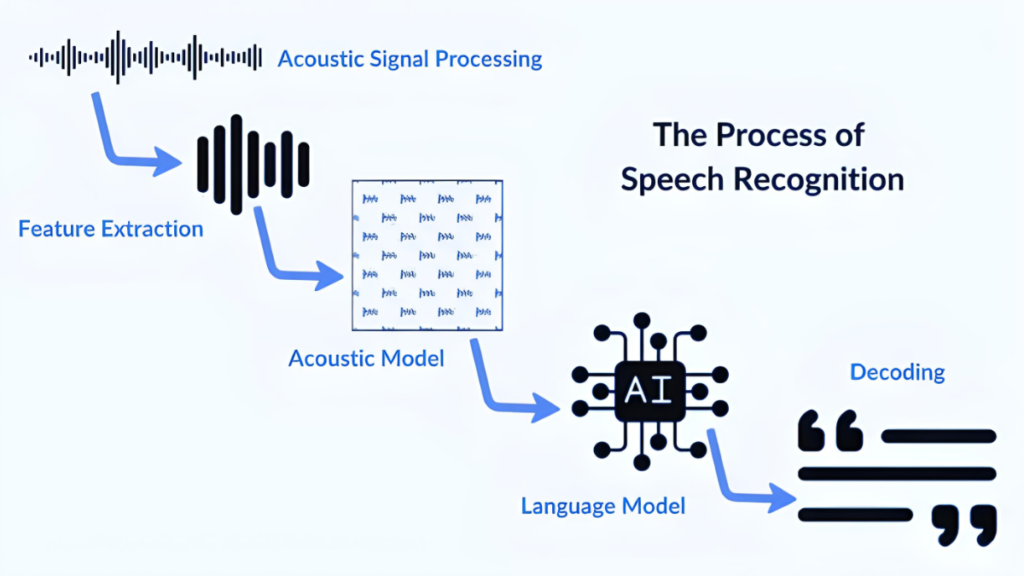
    Every modern ASR system processes audio in three conceptual stages, even if the boundaries between them are blurry in end-to-end neural systems.

    Stage 1: Acoustic processing

    Raw audio is converted into a compact representation that captures the information relevant to speech. The most common representation is a log-Mel spectrogram. It is a matrix showing how much energy exists at each frequency band over short time windows. A 1-second clip of audio becomes a 2D matrix of roughly 100 time frames by 80 frequency bins.

    This representation strips out information irrelevant to speech, like absolute recording volume. It preserves the patterns that distinguish phonemes from each other. It is the input to the neural network.

    Stage 2: The neural model

    The acoustic representation passes through a neural network that produces a probability distribution over possible text outputs. In Conformer-CTC models, the network outputs a probability for each character or subword unit at each time step. The CTC, Connectionist Temporal Classification, algorithm then finds the most probable sequence of text across all time steps.

    This stage is where most of the intelligence lives. The network learns, from millions of audio-text pairs, which acoustic patterns correspond to which linguistic units. It learns this separately for each language. That is why the training data language and the deployment language need to match for the system to work well.

    Stage 3: Language model rescoring

    The raw output of the acoustic model is often imperfect. It might confuse acoustically similar words. A language model trained on text in the target language rescores candidate transcriptions. It boosts sequences of words that are plausible given the context. In a banking context, the phrase about an EMI becomes the right transcription. A phrase about an Emmy does not.

    Modern end-to-end systems sometimes skip this step by baking contextual knowledge directly into a larger model. But for domain-specific deployments like BFSI or healthcare, a domain-tuned language model still adds measurable accuracy improvements.

    What Makes One ASR System Better Than Another

    Two ASR systems can claim to support the same language and produce completely different results on the same audio. The differences come down to four variables.

    Word Error Rate on your audio, not a benchmark

    WER, Word Error Rate, is the standard accuracy metric. It measures what fraction of words in a reference transcript were incorrectly transcribed. A WER of 5% means 5 words out of 100 were wrong. A WER of 25% means one word in four was wrong.

    The critical word in that definition is ‘reference transcript.’ Published WER numbers are measured on specific test sets, usually clean studio audio in standard language varieties. A model achieving 5% WER on a US English benchmark can easily produce 20 to 25% WER on Indian regional language audio over a phone. The benchmark number tells you how good the model is on the benchmark. It does not tell you how good it will be on your data.

    The only WER that matters for your deployment is the one you measure on your own audio. Any ASR vendor worth considering will give you a trial on your own recordings before you commit.

    Streaming vs batch architecture

    Batch ASR waits for a complete audio clip before processing it. Streaming ASR processes audio as it arrives and returns text in real time, often within 100 milliseconds of a word being spoken.

    For analytics and transcription of recorded calls, batch works fine. For any live interaction, a voice bot, a real-time captioning system, a voice-enabled mobile app, streaming is not optional. The architecture choice determines the minimum latency your product can achieve. Shunya Labs Zero STT supports streaming from the first audio chunk, returning a final transcript quickly for most utterances.

    Language depth, not language count

    A platform claiming to support 100 languages does not necessarily support all 100 at the same accuracy level. Many platforms support a small number of languages well and extend nominal support to others with limited training data and no real accuracy testing.

    For India, the distinction matters enormously. Standard Hindi over clean audio is supported reasonably well by most global platforms. Bhojpuri, Maithili, Chhattisgarhi, and Odia over 8kHz telephony audio can be poorly supported by any platform that did not train on those languages in those conditions. The Shunya Labs language list shows 55 Indic languages with production-grade accuracy data, not just nominal support.

    On-premise vs cloud only

    Most global ASR APIs are cloud-only. Audio is sent to a remote server, processed, and a transcript is returned. For consumer applications, this is usually fine. For regulated deployments in India, particularly BFSI and healthcare, sending customer audio to servers outside India may conflict with DPDPA requirements and RBI guidelines.

    On-premise ASR, where the model runs on infrastructure the enterprise controls, addresses this directly. Shunya Labs on-device model runs fully on-premise on CPU hardware, no GPU required, with the same model as the cloud version. Deployment details are at shunyalabs.ai/deployment.

    Where Speech AI Is Being Used in India Right Now

    The India Voice AI market was valued at USD 153 million in 2024. It is projected to reach USD 957 million by 2030, a CAGR of 35.7%. That growth is spread across several sectors where voice is already being used at scale.

    CONTACT CENTRES AND CUSTOMER SERVICE

    For example, Airtel runs automated speech recognition on 84% of inbound calls. Meesho’s voice bot handles around 60,000 calls daily, transcribing queries in multiple Indian languages. These are not experimental deployments. They are production infrastructure running at scale. The ASR layer is what makes them work.

    BFSI

    Banks and NBFCs can use ASR for outbound EMI collections, inbound balance queries, fraud detection through voice biometrics, and call quality monitoring. The Indian banking system received over 10 million formal complaints in FY23-24. Voice AI with accurate ASR can be one of the primary tools for managing this volume efficiently.

    HEALTHCARE

    Doctors dictate clinical notes. Hospitals run multilingual patient intake over the phone. Lab results and prescription reminders go out as voice calls. Each of these can use an ASR layer to convert spoken input or to process spoken responses from patients. The growth rate for healthcare voice AI is 37.79% CAGR globally, the fastest of any sector.

    FIELD OPERATIONS

    Insurance agents, FMCG reps, and microfinance field workers update CRMs, log activities, and record collections by speaking rather than typing. In Indic languages, typing speed is 18 to 23 words per minute. Speech is 130 to 150 words per minute. The productivity difference is substantial. It only works if the ASR handles the regional language the field worker actually speaks.

    ASR, Speech AI, and Voice AI: What the Terms Actually Mean

    These three terms appear constantly in vendor materials and often get used interchangeably. They are not the same thing.

    ASR is the specific technology: the model that converts audio to text. It is a component.

    Speech AI is a broader category. It includes ASR, but also TTS (text to speech), speaker diarization (who said what), speech analytics, emotion detection from audio, and other audio intelligence capabilities. When someone says they are building on a speech AI platform, they usually mean access to several of these capabilities through a single API.

    Voice AI describes complete voice-enabled products or agents: voice bots, voice assistants, voice-first applications. These are built on top of speech AI. A voice AI agent uses ASR to hear the user, an LLM to reason and respond, and TTS to speak the answer. The voice AI platform is the infrastructure layer underneath all of this.

    Shunya Labs is a speech AI and voice AI platform. Zero STT is the ASR product. Zero TTS is the text-to-speech product. Together they form the input and output layers for any voice AI application. The full platform overview is at shunyalabs.ai/overview .

    What to Look for in a Speech AI Platform for India

    If you are building something with voice, here is what to check before picking an ASR or speech AI platform.

    • Test on your audio. Not the demo. Your language, your recording conditions, your callers. Ask for a free trial on real data before committing.
    • Check streaming support. If you are building anything interactive, batch ASR adds 400 to 800ms of latency you cannot recover from.
    • Ask for WER on the specific languages you need. Hindi is not the same as Marathi. Indian English is not the same as US English. Get benchmark data for your actual use case.
    • Verify deployment options. If you are in BFSI or healthcare, understand where audio is processed and whether it meets your compliance requirements.
    • Check whether TTS is available from the same platform. Mixing an accurate ASR from one provider with a generic TTS from another produces voice agents that understand well but sound foreign. Native Indic TTS matters for user trust.

    Shunya Labs is built for India-first deployments. 

    References:

    • Fortune Business Insights (2022). With 23.7% CAGR, Speech and Voice Recognition Market Size to Reach USD 49.79 Billion [2022-2029]. [online] Yahoo Finance. Available at: https://finance.yahoo.com/news/23-7-cagr-speech-voice-080500463.html [Accessed 24 Mar. 2026].
    • IBEF (2025). India’s internet users to exceed 900 million in 2025, driven by Indic languages. [online] India Brand Equity Foundation. Available at: https://www.ibef.org/news/india-s-internet-users-to-exceed-900-million-in-2025-driven-by-indic-languages.
    • reverie (2026). Speech Recognition System: A Complete 2026 Guide – Reverie. [online] Reverie. Available at: https://reverieinc.com/blog/speech-recognition-system/ [Accessed 25 Mar. 2026].
    • Tsymbal, T. (2024). State of Conversational AI: Trends and Future [2024]. [online] Master of Code Global. Available at: https://masterofcode.com/blog/conversational-ai-trends.
    • www.marketsandmarkets.com. (n.d.). Speech and Voice Recognition Market Size, Share and Trends forecast to 2026 by Delivery Method, Technology Speech Recognition | COVID-19 Impact Analysis | MarketsandMarketsTM. [online] Available at: https://www.marketsandmarkets.com/Market-Reports/speech-voice-recognition-market-202401714.html.